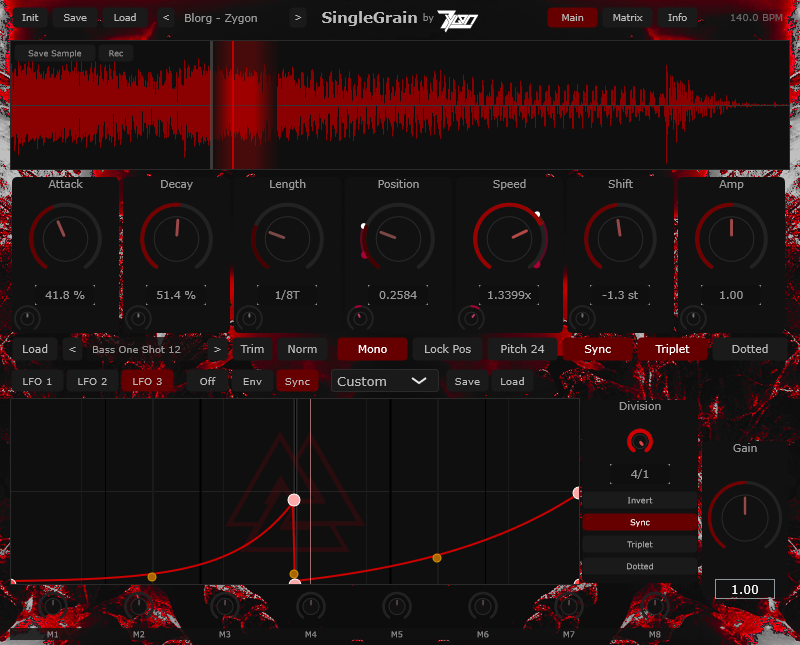
Global & File Management
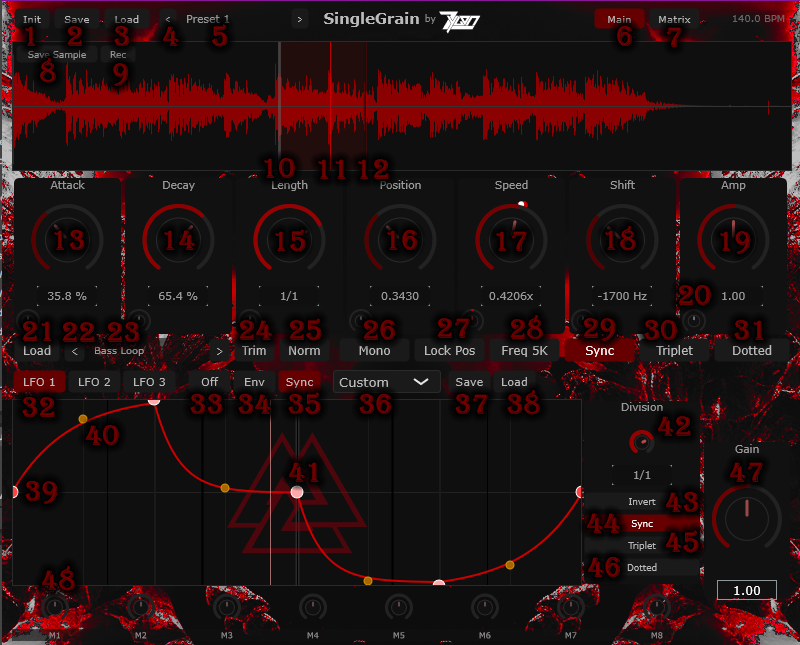
1Init:Resets the current patch to default
settings.
2Save:Saves the current patch as a preset for
future use.
3Load:Opens the file explorer to load an
existing preset.
4Next Preset:Quickly cycles to the next
available preset in the folder.
5Name:Displays the name of the currently loaded
preset.
6Main:Switches the plugin interface to the main
synthesis view.
7Matrix:Opens the automation matrix view to
manage complex modulations.
Grain & Playback Controls
8Length:Controls the end position (right
boundary) for the grain when unsynced.
9Attack:Adjusts the fade-in time when a grain
is triggered or retriggered.
10Decay:Adjusts the fade-out time when a grain
is triggered or retriggered.
11Position:Controls the start position (left
boundary) for the grain.
12Speed:Manages the playback speed of the
sample.
13Pitch:Shifts all frequencies after speed
effects have been applied.
14Amp:Controls the overall output volume of the
plugin.
15Small Knob:Controls automation depth. Drag an
LFO onto a knob to assign it. Drag a non-focused LFO to automate
the depth of the primary LFO.
16Load (Sample):Opens the explorer to import a
new audio sample.
17Arrow (Prev/Next):Quickly cycles through
samples in the current folder.
18Sample Name:Displays the name of the currently
active audio file.
19Trim:Crops the current sample to fit within
the designated play area boundaries.
20Norm:Normalizes the amplitude of the current
sample to maximize volume without clipping.
21Mono:Restricts playback to one grain at a
time; new notes will cut off the previous grain.
22Sync (Length):Toggle between Unsynced
(retriggering only occurs outside boundaries) and Synced
(standard playback with specific behavior for negative
speeds).
23Triplet:Switches the timing for synced
playback to triplet divisions.
24Lock Pos:Off: grain starts at the end of the
previous grain when speed is negative. On: grain start is fixed
to the designated position even when speed is negative.
Modulation & LFOs
25LFO Select:Choose which of the available LFOs
is currently active for editing.
26Off (LFO Mode):LFO repeats indefinitely and
ignores note-on triggers.
27Env (LFO Mode):LFO acts as an envelope; it
restarts at note-on and does not repeat.
28Sync (LFO Mode):LFO restarts at note-on and
continues to repeat.
29LFO Shape Select:Selection tool for the LFO
waveform shape.
30Save (LFO):Saves the custom-drawn LFO
shape.
31Load (LFO):Loads a previously saved LFO shape
file.
32LFO Rate/Division:Sets the speed/rate of the
LFO.
33Red Dot:Defines the starting position for the
LFO (the end position is mirrored).
34Yellow Dot:Click and drag to adjust the
curvature (slope) of the LFO segment.
35Pink Dot:Double-click to create a new point;
right-click to delete an existing point.
36Sync (LFO Rate):Synchronizes the LFO rate to
the host project's BPM.
37Triplet (LFO):Switches the LFO or Sync
divisions to triplet timing.
Output & Performance
38Gain:Allows you to increase or decrease the
master gain.
39M1 (Macros):A master control knob that allows
you to manipulate multiple parameters simultaneously.